
Windows Client Guide
Overview
The Windows desktop client connects your laptop to the phone's SOCKS5 proxy and creates a TUN virtual adapter, routing all system traffic through the phone's connection.
Installation
Option 1: Standalone EXE (Recommended)
- Download
Hotspot_Bypass_VPN_Windows.exefrom the Download page. - Run the executable. If Windows SmartScreen shows a warning, click More info → Run anyway.
- The app will request Administrator privileges — accept it (required for TUN virtual adapter).
Option 2: From Source
bash
git clone https://github.com/nestchao/Hotspot-Bypass-VPN-Unlimited-Hotspot.git
cd Hotspot-Bypass-VPN-Unlimited-Hotspot/laptop_proxy
pip install -r requirements.txt
python main.py
Quick Start
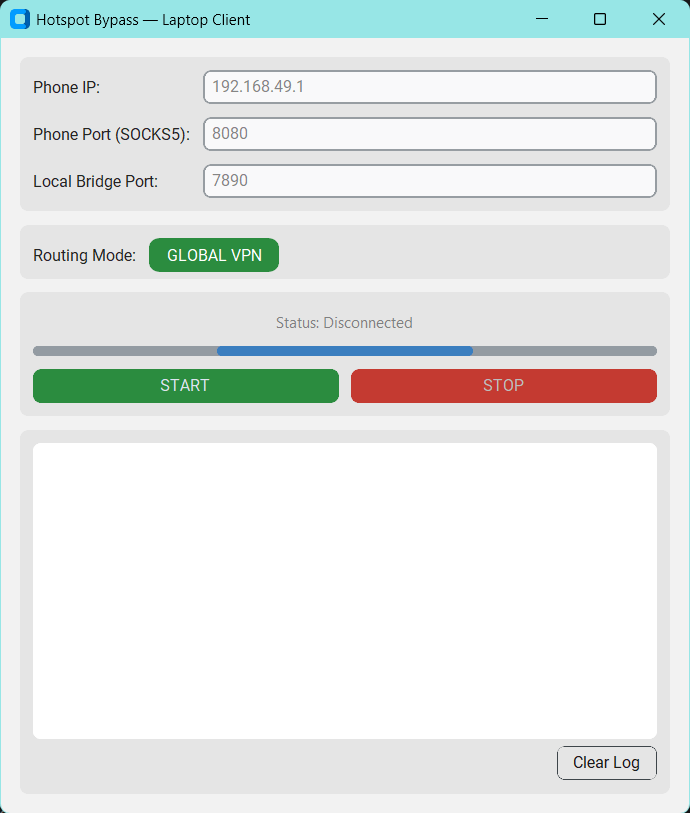 Windows client main interface
Step 1: Phone Setup
Make sure your phone is running in Host mode (see Android Guide).
Note the connection details:
- SSID:
DIRECT-HotspotBypass - Password:
87654321 - Proxy:
192.168.49.1:8080
Step 2: Connect Laptop to Wi-Fi Direct
- Open Wi-Fi settings on your laptop.
- Find and connect to DIRECT-HotspotBypass.
- Enter password 87654321.
Step 3: Launch the Windows Client
- Open the Windows client application.
- Enter proxy details:
- Proxy IP:
192.168.49.1 - Proxy Port:
8080
- Proxy IP:
- Click Start VPN.
- The app will automatically download tun2socks and wintun dependencies on first run, then create a TUN virtual adapter.
Step 4: Verify
- Check the status indicator — it should show Connected.
- Open a browser and visit any website — traffic should be routed through your phone.
- Check the live log for connection details.
Troubleshooting
| Issue | Solution |
|---|---|
| "Administrator privileges required" | Right-click the EXE → Run as administrator |
| tun2socks download fails | Check your internet connection. The app can connect through the phone's proxy first. |
| TUN adapter not created | Run the app as Administrator. Disable any other VPN software. |
| No internet after connecting | Try restarting the VPN. Check the phone is still in Host mode. |
| Game lag / high ping | Switch phone to 5GHz Wi-Fi Direct band. Reduce distance between devices. |
| Bridge mode not working | Make sure ICS is configured correctly. Restart the mobile hotspot. |